
Home education · Parent portal
See exactly how your child is getting on
The parent portal sits alongside your child's Lift College account. Study days, lessons finished, marked work and tutor feedback, all in one place on your phone or computer, without having to ask "have you done any work?".
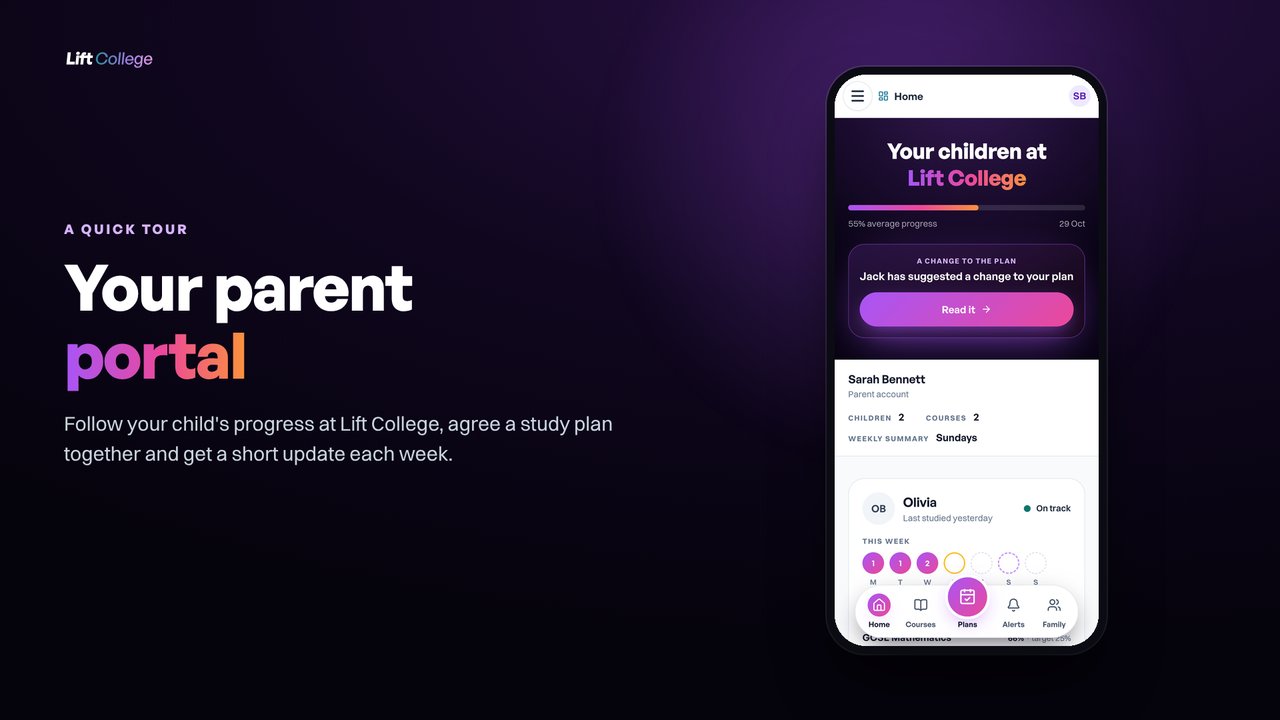
- Progress against target, for every course
- Marks and the tutor's feedback on each assignment
- A weekly study plan you agree together
- A short summary email each week




 Exams with


What is the Lift College parent portal?
The parent portal is part of Lift College. It shows a parent or guardian how their child is getting on with every course: study days, lessons finished, progress against their target, the work they hand in with the mark and tutor's feedback, and a weekly study plan agreed together. Each parent or guardian has their own login, and a weekly summary email keeps the family up to date. Because it keeps a running record of study and marked work, families often use it when they explain their home education to their council.
What you see in the portal
Everything about their learning, in one place
The portal answers the questions parents ask most: are they studying, are they on track, and what have they been learning?
Study days, at a glance
A circle for each day of the week: filled days are study days, with the number of lessons finished. The last four weeks are shown too, with darker days for more lessons.
Progress against target
Each course shows progress against an even pace to the target finish date, with a clear on track or behind.
Marks and tutor feedback
Every assignment they hand in: their answers question by question, the mark, passed or returned for more work, and exactly what their tutor said.
Something to talk about
The last lessons they finished. Asking them to explain one is a simple way to help it stick.
A study plan you agree together
Build a weekly plan together in about 10 minutes: finish dates, study days, session length and milestones. Your child agrees it on their own account.
Alerts if the plan slips
Choose what we email you about, from a missed planned day or a milestone at risk to marked work and exam entry deadlines. Alerts are designed not to nag.
A weekly summary email
One email for the family on the day and time you choose: study days, lessons, marks, the plan and what is coming up.
A login for each parent or guardian
Invite another parent or guardian. Each of you has your own login and your own alert settings.
Private and secure
Only Lift College links a child's account to a family. Your child can always see who is linked, and messages between your child and their tutor stay private.
Watch the tour
A quick tour of the parent portal
In about two and a half minutes the tour walks through each part of the portal, using a sample family.
- 01Home
Every child at a glance: this week's study, progress against target and their study plans.
- 02Each child
A closer look: whether each course is on track, and the calendar of study days over the last four weeks.
- 03Marks and feedback
The work they hand in, the mark and what their tutor said.
- 04Study plans
Make a plan together: a finish date, the days and session length they can keep to, and what they will do if something gets in the way.
- 05Following the plan
Week by week: planned days kept and study time against the time planned.
- 06Alerts
Choose what you are emailed about, and when. Each parent or guardian has their own settings.
- 07Courses and family
Add a course to your child's account and invite another parent or guardian.
The parent guide
Everything in the portal, page by page
The guide shows each screen with notes on what it means and how to use it: Home, each child, marks and feedback, study plans, alerts, family and courses, and how to get started. Keep it to hand, or share it with the other adults who support your child.
- What the portal is
- Every child at a glance
- A closer look at each child
- Marks and feedback
- Making and following a study plan
- Alerts and the weekly summary
- Family and adding courses
- Getting started
For families and councils
A record you can share with your council
Home education is the parent's responsibility, and how a family shows the education their child is getting is up to them. The portal is private to your family: it keeps a record that parents can choose to show.
The annual check-in
The Department for Education's guidance for local authorities recommends that councils ordinarily contact home-educating parents at least once a year, so they can stay informed about the education being provided. It says the information parents give should show the education actually being provided, including the progress expected and achieved, and should not be dismissed just because it is not in a particular format.
Source: DfE, Elective home education: guidance for local authorities (gov.uk)Registers of children not in school
The Children's Wellbeing and Schools Act 2026 (section 38) adds registers of children not in school to the Education Act 1996. Under the new section 436D, parents will give their council information including who provides their child's education and estimates of the time the child spends receiving it. Under section 436E, a council may ask an out-of-school education provider for information. These duties apply once the provisions come into force, on a day set by regulations.
Source: Children's Wellbeing and Schools Act 2026, section 38 (legislation.gov.uk)- Study days and lessons finished, week by week and over the last four weeks
- Each course, with progress against its target finish date
- Every assignment handed in, with the mark and the tutor's feedback
- The agreed study plan, planned days kept and study time against the time planned
- The courses your child is taking with Lift College
This is general information, not legal advice. Your council will tell you what it asks for. Families often show their council what the portal records alongside their own notes on the rest of their child's education.
How it fits home education
The parent stays in charge
Lift College provides the taught course, one subject at a time. You decide how it fits into the rest of your child's education.
The parent holds the account
Under 18s enrol with a parent or guardian's permission and support. The portal gives you your own view alongside your child's account.
A named UK tutor
The same subject specialist throughout, with marked work back in 5 to 7 working days. The study plan is for guidance and does not replace the tutor.
No live classes
Work is set and marked in writing by the same named tutor, at your child's pace.
FAQ
Parent portal questions, answered
Can both parents log in?
Does my child know what I can see?
Can I share a progress record with our council?
Who can have a parent portal?
How do I get set up?
Does the study plan replace the tutor?
Explore home education
More for home-educating families
Courses, how it works and the 7-day free trial.
GCSEs at homeHow home-educated teenagers study and sit GCSEs.
Private candidatesHow exam entries work when your child is not at school.
For local authoritiesInformation for council home education teams.
GCSE plannerPlan the subjects and the years ahead.